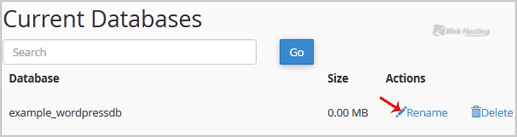
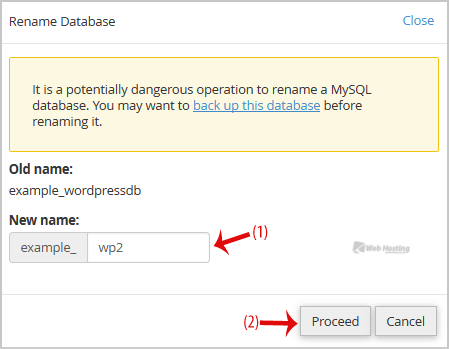
Məlumat bazası Azerbaijan Hosting Provider Məlumat bazası Databases How to rename a database in cPanel? Toggle Sidebar How to rename a database in cPanel? 1. Log into your cPanel account.2. In the "Databases" section, click on "MySQL Databases" Icon. 3. Under "Current Databases", You can see list of your all databases. Locate the Database and then click on "Rename" Icon.4. Change database name and then click on "Proceed" button. 4 istifadəçi bunu faydalı hesab edir Bu cavab sizə kömək etdi? Hə Yox Uyğun məqalələr How to delete a database in cPanel? 1. Log into your cPanel account.2. In the "Databases" section, click on "MySQL Databases"... How to Create a Database Username in cPanel? 1. Log into your cPanel account.2. In the "Databases" section, click on "MySQL Databases"... How to create a database in cPanel? 1. Log into your cPanel account.2. In the "Databases" section, click on "MySQL Databases"... How to add a user to a database and add privileges? 1. Log into your cPanel account.2. In the "Databases" section, click on "MySQL Databases"... How to import database via phpMyAdmin in cPanel? 1. Log into your cPanel account.2. In the "Databases" section, click on "phpMyAdmin" Icon. 3. In...