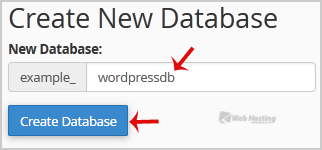
Base de connaissances Accueil Base de connaissances Databases How to create a database in cPanel? Toggle Sidebar How to create a database in cPanel? 1. Log into your cPanel account.2. In the "Databases" section, click on "MySQL Databases" Icon. 3. In "New Database: Username_" field enter a name for the new database you wish to create in the text field.4. Click on the "Create Database" Button. 4 Utilisateurs l'ont trouvée utile Cette réponse était-elle pertinente? Oui Non Articles connexes How to delete a database in cPanel? 1. Log into your cPanel account.2. In the "Databases" section, click on "MySQL Databases"... How to rename a database in cPanel? 1. Log into your cPanel account.2. In the "Databases" section, click on "MySQL Databases"... How to Create a Database Username in cPanel? 1. Log into your cPanel account.2. In the "Databases" section, click on "MySQL Databases"... How to add a user to a database and add privileges? 1. Log into your cPanel account.2. In the "Databases" section, click on "MySQL Databases"... How to import database via phpMyAdmin in cPanel? 1. Log into your cPanel account.2. In the "Databases" section, click on "phpMyAdmin" Icon. 3. In...